

Latest Products


Contact Us
- The Fourth Floor, A-A3 Zone, Aviation Business Area, DongLi Distrct, Tianjin, China.
- >salesmanager@coilwinding machinechina.com
- +8613072088960


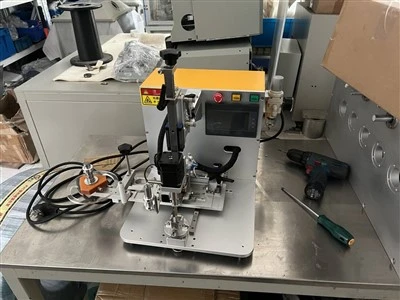

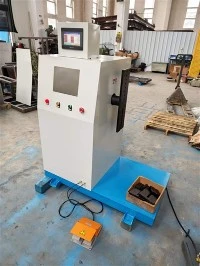
Toroidal Transformer Side Wrapping Machine
Model:GW-7001T
Starting Angle: This refers to the direction from which the tape should begin application after the product is loaded into the fixture. Angles are available in 0°,90°, 180°, and 270° (rotatable).
Stop Angle: This refers to the direction from which the tape should be cut and applied after the tape has been applied. Angles are available in 0°, 90°, 180°,and 270° (selectable).
Tape Number of Coating Turns: The touchscreen allows setting 0-10 turns.Generally, the set number of turns should be one turn less than the actual number of turns.
Press the Home button to return to the machine's main motion page.
Axis Setting: See the next page for details
Description
Organization Introduction

Instructions:
1. When the emergency stop button is pressed, the machine stops running, and all other buttons become inactive. Pressing the start button a second time after the emergency stop button has reset will reset the machine; pressing it a second time
will start the machine.
2. After pressing the jog button, pressing the start button will initiate a single-step operation; that is, pressing the start button once will initiate one action.
Touchscreen Screen Introduction:

Instructions:
1. Selecting "Manual Screen" switches the display to the manual screen, typically used during system setup.
2. Selecting "General Settings" switches to the system settings screen.
3. Advanced settings are not used.
Manual Adjustment:


To avoid collisions, when adjusting the position of the large plate, you must first press the left and right buttons on the large plate to move it to the left, and then press the front and back buttons on the large plate.
General Settings Screen

1. Starting Angle: This refers to the direction from which the tape should begin application after the product is loaded into the fixture. Angles are available in 0°,90°, 180°, and 270° (rotatable).
2. Stop Angle: This refers to the direction from which the tape should be cut and applied after the tape has been applied. Angles are available in 0°, 90°, 180°,and 270° (selectable).
3. Tape Number of Coating Turns: The touchscreen allows setting 0-10 turns.Generally, the set number of turns should be one turn less than the actual number of turns.
4. Press the Home button to return to the machine's main motion page.
5. Axis Setting: See the next page for details.
Axis Setting Screen:

1. Axis setting password: 8848.
2. Use the jog function (either forward or reverse) to rotate the axis. Once the axis reaches the desired position, click "Load and Save Standby Position".
3. Axis 0: Rotary axis rotation.
4. Axis 1: Downward axis rotation

Video
No Information
Previous
Next
You Might Also Like


Send Inquiry
